Showing posts with label Tech Stuff. Show all posts

Google Search settings keep changing language - i cant read it to change back again!

If tyhe title of this blogpost describes your problem then copy and paste this into the google help forums to help consolidate what i belive is one of the stupidest and nmost arrogant assumptions of the modern web 2.0 enviroment.
Google wishes us to keep their cookies in our temp folders so they candecide what we want for us.. machines will never be able to decide whjats better for us, and even if they could we dont want this, as that would be the end of personal freedom of choice.

Considering almost anyone with any sense clears all their temp, cookie and cached files on shut down or browser closure (even my grandma these days knows to do this), it should be obvious that this consumer tailored attempt to think for the end user is of absolutely no use, and in fact, considering that most people cannot read other languages, can cause a massive boob!
a perfect example is with my case;
i live in thailand.
every time i open google, the page loads in Thai, which is completely unreadable for most endusers who are not Thai.
So even if i can remember visually where the search settings link is (top right in google search page), when i find the drop down list to go to change language settings, it is in Thai and unreadable, preventing me from knowing which option to select
 once i try each link and finally see a load of tick boxes wit the languages to chose as default, it is still unreadable! (or would be if i couln not read Thai, which luckily i do)
 
why?
because the language tickbox for english does not say 'English' in english! It says 'ภาษาอังกฤษ'!!!!!
so assuming an english speaking monolingual person lives in or is in Thailand for holiday, opens his search page and had deleted cookies,the page will be unreadable.
 
The dumb assumption that because you are surfing the web uin arabia, means that you can read arabic proves that you google people arent thinking straight
 
no one wants your cookies boys, i for one at least dont.. i just want to surf the web as i wish and choose what i want myself without others resetting my choice of settings.
 
The real solution would be to do what you are anyway doing; cache our info on your servers not in cookies on our pc, so that when we delete cookies our search settings are not lost.
 
I dont believe you cant do this because;
i opened a page called hi5 where i was a member but didnt use since i changed pcs (2 pcs since i last went there)
as i went to log in.. the page automatically remembered my passwoird and log in. This is the case with a few other places i never visited with this laptop i have now.. so how in heck does my login info get kept?  serverside of course.
 
in the end you are going to either remove the pcs ability to delete cookies a la 1984 george orwell novel, or give up trying to make us keep cookies and temp files. If i kept them my internet connection would die anyway. Often it is that i cant connect to internet unless i delete all temp files cache and cookies.. so then when i go to google my page is all in Thai, and go to msn this stupid pop up comes up in thai asking me if i ching chiong ping pong pampadopop pampu?
now how in the world will my mum know what the stupid pop up is asking nor which option to select.
 
I have posted about this before.
Please find a solution or stop setting things automatically to the language of that region
 
best solution for an easy workaround
in Thai language selection optionsd change the text which is visible in the tickboxes from 'ภาษาอังฤษ' to 'ภาษาอังฤษ' /English'!!!
at elast this way both Thais and English speakers will both understand the language options
the same goes for thai/arabic, thai/cyrillic and al other permutations which apply
if you use your brain to think for a moment, it is more likeley that an English speaker will want to change ghis search settings to english than a thai speaker.. so why is the tickbox for english and indeed all languages displayed inb only thai (or in arabia only arabic, in russia only russian etc)???
Put the tickboxes on search settings language options in the language that is displayed in each tickbox
interface language dropdown must say (using Thai/English as an example.. this applies to all languages) the following;
if it is currently in english; 'ไทย/Thai' and if it is in Thai currently then 'อังกฤษ/English' etc... this is what you are blinkered on and haven't thought of.. its so obvious even a ten year old should be able to figure it out.. you are well paid in google now use your brains a but better and don't assume we are all multilingual.
 
related;

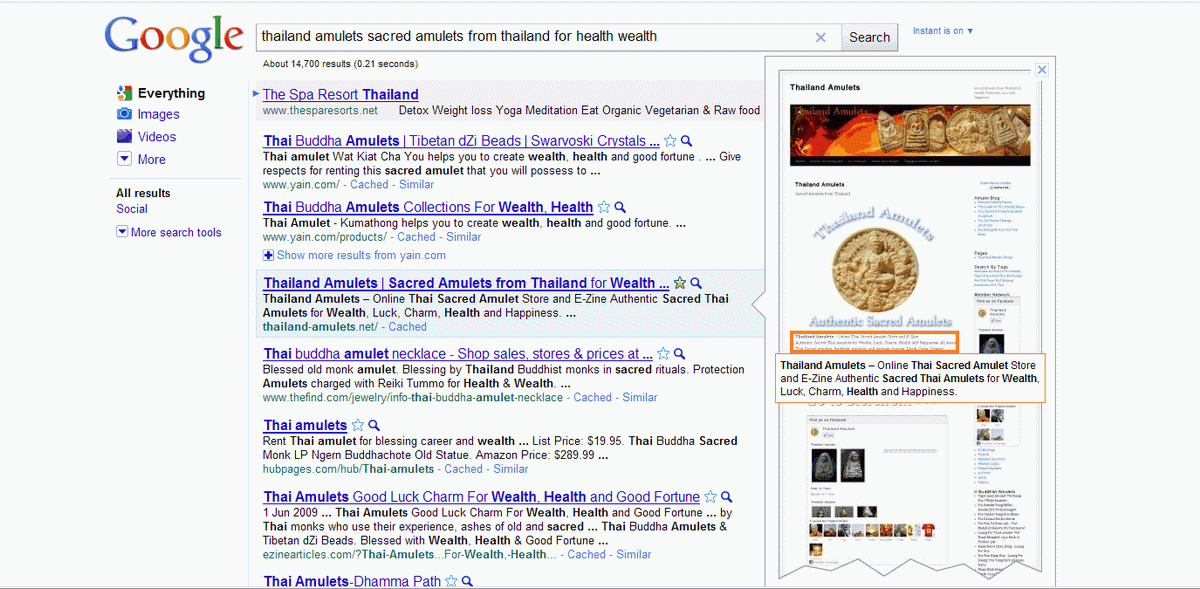
Google has thumbnails on search page!

I did a page refres whilst searchin on google the other day, and all of a sudden there was a thumbnail of the website search results link( and a big thumbnail at that with pop up descriptions) that i was floating my mouse cursor over.
Here is what the new google search results look like - a visual improvement indeed, which will i belive push webmasters to have to put more effort into designing their homepages if they want people to feel more inclined to click on the links they see in search results and come to their sites.


This new feature (a great idea by google), will influence greatly which websites we visit because we will see how good the sites look without ever having to click on the links first before we know what a site looks like.

Heres a closer look at what the popup thumbnail looks like on Google search

xxxx google and bing you unfair axxholes

do a search for 'windows live' using google
 all it gives you is www.explore.live.com adresses
 so you click on it and then end up cursing xxxx microsoft!!!
why?
because the page has all the same links and names as windows live.. except when you click on hotmail or messenger or whatever.. the link takes you to an info page about hotmail and keep pressing on the hotmail link it just takes you round and round in a circle to this page explaining what hotmail; is but no  sign up link or log in
 you have to type windowslive.com into the adress bar because google wont give the hotmail page in its first page results
 this means they are giving inferior links to the main real page related to that search term
 meaning their search engine doesnt search for you, it searches for google afilliates only

which is biased, monopolized and faschist!

the same goes for search for 'google' using msn or bing
 they just put their friends and family in their directory and exclude a list of their 'competitors'

well as far as i am concerned, this is unfair and unethical behaviour and makes me want to boycott their search engines more than use them

so lets all try using some smaller search engines just so they notice millions of searches less a day and wonder why we dont use their faschist multinational monopoly
 because they take us for idiots
 but they are the idiots because in the end we will stop using their search if it wont even take you to hot dog dot com when you type the woprd hot dog in there, rather put google.hotdog.com instead.

come on google! how in heck can you give a subdomain of windowslive.com as the number one search result for search term 'windows live'???
 it should be live.com as number one result
you are just being childish possessive and silly and it make you look like an asshole to all of us when we see these altered results..

Get a decent ethical behavior or ill start using other search engines just to  not support such atrocious behaviour
 a search engine should be unbiased if not it will never be efficient evaluation

Nullsoft Winamp 5.581 (wnaspi32.dll) DLL Hijacking Exploit

Anyone laying ePSXe will perhaps have had the failure message saying that wnaspi32.dll is missing or has been tampered with. This can be because of various reasons, normally to do with cracked editions of Nero Burning Rome, or usage of Daemon Tools as a method of mounting ISO files or MDS, IMG, CCU files etc.
But the below hacker exploit is also a possibility, in the case of the pc having Winamp media player installed;

Nullsoft Winamp 5.581 (wnaspi32.dll) DLL Hijacking Exploit
Vendor: Nullsoft.
Product Web Page: http://www.winamp.com
Affected Version: 5.581 (x86)

Summary: Winamp is a media player for Windows-based PCs,
written by Nullsoft, now a subsidiary of AOL. It is
proprietary freeware/shareware, multi-format, extensible
with plug-ins and skins, and is noted for its graphical
sound visualization, playlist, and media library features.

Desc: Winamp 5.581 suffers from a dll hijacking vulnerability
that enables the attacker to execute arbitrary code on a local
level. The vulnerable extensions are .669, .aac, .aiff, .amf,
.au, .avr, .b4s, .caf and .cda thru wnaspi32.dll and dwmapi.dll
libraries.

gcc -shared -o wnaspi32.dll winamp.c

Compile and rename to wnaspi32.dll, create a file test.cda and put both
files in same dir and execute.
----

Tested on Microsoft Windows XP Professional SP3 (EN)

Adsense overdue and no payment? Here is why

After several late issues and false earnings reports on my google adsense cp i have found out why this has been happening

Google Adsense help has issued a notice explaining how to view the data accurately, as the dta display has a glitch in it which google are trying to fix.
You must look at earnings from all time, not 'last 3 months' in order to view the data accurately
here is the full explanation;
http://www.google.com/support/forum/p/AdSense/thread?tid=5f1686088c248071&hl=en
 Google Adsense has oroved to be the only affiliate marketing solutuin with which i ever made a cent, so if you have a websie and are looking for a way to monetize it, i recommend using your free space for adsense ads instead of all the opther afilliate marketing sites, for they never pay. Adsense pays per impression too not only per click or sale!

Useful Iterature;

Google AdSense For DummiesGoogle Advertising Tools: Cashing in with AdSense and AdWords (Animal Guide)

Google AdSense Secrets: 4th Edition Make Easy Money with Google: Using the AdSense Advertising Program
Google Advertising Tools: Cashing in with Adsense, Adwords, and the Google APIs Ultimate Guide to Google Ad Words, 2nd Edition: How To Access 100 Million People in 10 Minutes

Why Google Site Censorship is erroneous

Why is Googlesite censorship erroneous and useless? The answer is easy;
From all the warning pages i have seen in firefox on google search, none of them ever turned oout to be a malware or adult site after clicking and looking. Whereas the real porn and spam sites never have this google warning page at all!
Here is a good example of a case i found this morning (see screenshots below).

In the above screenshot you can see that there is an adult content warning. This kind of page appearing will prevent 90 percent of users from clicking and continuing to the site.

Luckily i know that googles anti spam and anti malware detection is absolutely useless,and so i clicked on the continue button and here is the page i got;

Say no more.. Google are managing to let all the spammers and malware merchants through and are putting honest legitimate businesses at a disadvantage by classing their websites asdangerous, adult or malware sites.

Most Thai language websites seem to get a malware warning but this is more because of somejavascript or some unicode in their pages which make the googlebot think that it is malware.. i have visited so many buddhist websites in thai that are free and dedicated to spirituality only and they are being flagged by google as malware.

Google dont care if your site is real or not.. they are too stingy to pay living people to check your site (after an automated googlebot malware warning - then i believe that an employee should have to manually inspect the site).

Hey Google! Whjen are you going to wakeup to the fact that automated scripts will never be able to do this job for you?
get your hands in your pockets and pay a person to do it because without the discretion of a living brain a bot will never be able to accurately distinguish whether i am writing Thai words in English letters, or just typing nonsensical spam (You fucking idiots! not every word in roman letters on an English website is English you know!)

While I'm at it.. does anyone else find it as sickening to have to define which country one is in and which language one wants their Google page in every time they open the browser?

all these automated tasks with cookies etc do not help the enduser.. they get on our nerves you idiots. as soon as a cookie is deleted (namely as soon as my browser closes), the info is gone.. so the next time, and every time i go to google home this pop up with "select your country and language first" pops up and costs me  2 minutes of time and frustration each time.

Just piss off and stop trying to decide what you think i want mr. Google

Why Google Chrome is a crap Browser and how Blogger wysywig got worse

And why google developers are stupid;
 Blogger is just as crap with their "new interface" which works less than the "old editor"
You cant stretch images by double clicking anymore, which means if you started with a 450pxwide content area on original template and change the width after, the max size of images will remain as small as they were set for the original small template!. The code or options to change this are not available to the end user, so cannot be changed.
The Google Way: How One Company Is Revolutionizing Management as We Know It


Firstly, writing in this textfield on a google blogger blog i cant even press enter to go to a new line.. google blogger and google chrome dont even recognize a simple keyboard button command! This is something you would perhaps see 20 years ago with the first pcs (not even then actually), and proves one big thing; Google developers dont test their products out to see if they work before releasing them.

What Would Google Do?  Planet Google: One Company's Audacious Plan to Organize Everything We Know Google Apps: The Missing Manual

That's like cooking without tasting it before you serve it.
A new line ends up with your cursor at the bottom of the post. Autosave goes off every 0 seconds or so and interrupts editing freezing the browser. What avid blogger wishes to have his browser go dead on him in mid typing every minute? baahhhhh..all thosemillions and they cant even design a wysywig to work properly.

Google Blogger For DummiesPublishing a Blog with Blogger: Visual QuickProject Guide (2nd Edition)Blogging Heroes: Interviews with 30 of the World's Top Bloggers

The text alignment used to have all three positioning options visible and clickable on the interface. Now they have made it into a drop down menu. This means you have one more step to make between every text alignment, and slows 


Anyway lets leave blogger bugs behind and get on to why google chrome is so crap;

The google chrome contact form  doesn't work either with google chrome or firefox.
It wont send and keeps asking you to fill in two "radio tabs"(which are drop down menus actually, not radio tabs.. another proof of google not paying attention to what they were doing when they did it).


Also it doesnt load web pages often and gives you a stupid kiddy-like "oops" text.

do they think everyone fromexecutives to gardners like this kind of MTV terminology? Is it supposed to be cute? or simply a product of the fact that the interfaces are designed by stupid kids?

here is the solution given, which doesnt work of course; uncheck the dns prefetching checkbox.


Here is the letter i tried to send to chrome as feedback but could not because their stupid form doesn't work and was therefore obviously just written and released without testing.

read on and weep


Dear Chrome;
first complaint is that this form doesnt work with chrome, (wow you guys are really stupid - you dont even test your scripts with your own browser)!!

Please try to make the cursor able to appear on the right side of a word in google search..clicking on the last letter on right will result in the cursor always appearing at the left of the first letter. - text selection is almost as bad as IE explorer which is crap for webmasters or forum posters who need to edit text using wysywig editors.. try to select three letters and the mouse selects either all the ones you don't want, or at best includes two or three neighboring characters too. Imprecise and buggy! Impossible to use. Facebook and other JS driven pages (meaning almost all pages these days) become unresponsive after 2minutes of idle.

Get a testing team chrome. you have a long way to go yet - dont release it until you try to use it yourself.
Try using it for the following
text selection cut and paste
searching and editing search words in the google search box
editing using blogger wysywig
using facebook and other pages with loads of java in it to blow the local cpu with.

Then you will See how chrome is crap for these functions


Summary;
The advent of Web2.0 has left servers free of computing server side using php and has thrown the work onto our local cpus using Java, which, because of hundreds of different companies developing web based software apps using varied methods of coding has caused our apps such as browsers or wysywig editors etc to crash and have bugs in. There will be no end to this problem now because;

When a plugin updates the browser cannot adapt to it. Then the browser updates and the plugins dont work anymore
 and so on. Updating is a bad idea because the other apps and plugins wont work until theyir developers have adapted the code to newer versions of browser, or whatever the app might be.

 Web 2.0: A Strategy Guide: Business thinking and strategies behind successful Web 2.0 implementations Web 2.0 Architectures Web 2.0 and Social Networking for the Enterprise: Guidelines and Examples for Implementation and Management Within Your Organization

I miss the days of php and the absence of JS.. browsers had just started to work well and then they brought out web2.0

it was harder for stuff like facebook,my space etc to take dominance.
And although we use these things, we all know that they represent a worsening of Human quality of living,leaving us all pegged to the screens of some silly app within a social network sending vegetables to each other or cushions or something.

The AdSense Code: What Google Never Told You About Making Money with AdSense  How to Make Money Online with eBay, Yahoo!, and GoogleMake Money Teaching Online: How to Land Your First Academic Job, Build Credibility, and Earn a Six-Figure Salary
 Multiple Streams of Internet Income: How Ordinary People Make Extraordinary Money Online, 2nd Edition

Instand Handheld Library

Amazon Kindle books available for reading on iPhone, Blackberry and iPad


Amazon Kindle is now worth buying - and loads of books in their collection are absolutely Gratis, or free for a limited period, and the range of choices in Genres is now relatively wide. But the best thing of all is that Kindle is now avaiable for iPhone and Blackberry, as well as iPad oe iPod Touch. It only takes sixty seconds for you to download your favourite choice in literature, and read it on your hand held mobile multimedia device. Kindle now has literature on my most avidly read topic; Vipassana Mindfulness meditation.

Read Kindle books on your iPhone or iPod touch

  No Kindle required
Get the best reading experience available on your iPhone or iPod touch. Access your Kindle books even if you don't have your Kindle with you. Automatically synchronizes your last page read between devices with Amazon Whispersync. Adjust the text size, add bookmarks, and view the annotations you created on your Kindle

   The Calling, A Journey Within Your Own BeingSelf Realization, An Owner-User Manual for Human Beings Buddhism for BeginnersBuddhism Plain and Simple


ePublish: Self-Publish Fast and Profitably for Kindle, iPhone, CreateSpace and Print on Demand Optimizing Your Website for the iPhone (Digital Short Cut): Ensuring your website works on the iPhone and iPod touch Apple iPod touch 32 GB (3rd Generation) NEWEST MODEL


Product Info;

New Features on the Kindle for iPhone App, read in portrait or landscape mode, Select alternate background and text colors to improve reading comfort in low light conditions, Tap on either side of the screen or flick to turn pages, and Pinch to zoom images in books.

Buy a book from the Kindle Store optimized for Safari on your iPhone or iPod touch and get it auto-delivered wirelessly.
Search and browse more than 540,000 books, including more than 96 of 112 New York Times bestsellers. If you are a non-U.S. customer, book availability may vary.

Find New York Times® Best Sellers and new releases from $9.99
Get free book samples. Read the first chapter for free before you decide to buy
Books you purchase can also be read on a Kindle
Kindle newspapers, magazines and blogs are not currently available on the iPhone or iPod touch.

Kindle for iPhone is currently available for customers in Argentina, Australia, Austria, Belgium, Brazil, Canada, Chile, Colombia, Costa Rica, Croatia, Czech Republic, Denmark, Dominican Rep., Ecuador, El Salvador, Estonia, Finland, France, Germany, Greece, Guatemala, Honduras, Hong Kong, Hungary, India, Ireland, Israel, Italy, Jamaica, Japan, South Korea, Latvia, Lithuania, Luxembourg, Malta, Republic of, Mexico, Moldova, Republic Of, Netherlands, New Zealand, Nicaragua, Norway, Panama, Paraguay, Peru, Philippines, Poland, Portugal, Romania, Russia, Slovakia, Slovenia, South Africa, Spain, Sri Lanka, Sweden, Switzerland, Taiwan, Thailand, United Kingdom, United States, Uruguay, Venezuela, Vietnam.


    15-Item Accessory Bundle for Apple iPod Touch 2G and 3G Blackberry 8830 Phone (Sprint) BlackBerry Curve 8330 Phone, Pink (Verizon Wireless) 

    Books available on Kindle;

    Enough: Contentment in an Age of Excess  White Sister: A Shane Scully Novel Becoming the Answer to Our Prayers: Prayer for Ordinary Radicals Flickering Pixels: How Technology Shapes Your Faith

    Harry Potter's Bookshelf Mugglenet.com's Harry Potter Should Have Died: Controversial Views from the #1 Fan Site Harry Potter and the Sorcerer's Stone: Shmoop BestsellersThe Magical Worlds of Harry Potter (revised edition)

    Space Prison, The Survivors (The science fiction thriller classic!) To Bless the Space Between Us: A Book of Blessings Seizing the White Space: Business Model Innovation for Growth and Renewal Follow Me to Freedom: Leading As an Ordinary Radical 

    The World According to Twitter  Chicken Farmer, An American Fable The Audacity of Hope: Thoughts on Reclaiming the American Dream Decoding The Lost Symbol: The Unauthorized Expert Guide to the Facts Behind the Fiction